
Be in the know with SAVAGE AI News & Free Articles!
Your source for AI news and training options for your team!
Welcome to your ultimate source for cutting-edge AI news and insights! Dive into the world of Microsoft AI, where you’ll discover the latest advancements in Azure and Copilot. Stay informed about groundbreaking technologies like ChatGPT, Google Gemini, Apple Intelligence, and Meta AI. From Healthcare to Finance, Manufacturing to Customer Service, we are committed to finding and explaining the tools that are reshaping industries.
Join us as we navigate the future of artificial intelligence and its profound influence on our world and how we get work done. We will also focus on skills training that helps individuals, businesses, and organizations make practical use of these tools in a responsible way.
-
✴︎
Work Smarter with AI: Why I Stopped Glorifying “Busy” and Started Making Time for What Actually Matters
Work Smarter with AI! Tired of burnout and hustle culture? Discover how I stopped glorifying “busy,” embraced AI, and finally started working smarter with more purpose and less stress.

The Slow Burn of Success
Last year, I found myself constantly racing the clock—trading sleep for deadlines and skipping meals for meetings. I was productive. Efficient. Rewarded.
But somewhere in the middle of my so-called success, I lost the time to think. To breathe. To live.
I didn’t quit because I had a seven-figure business lined up. I quit because I couldn’t keep calling exhaustion “ambition.” I was done surviving on coffee, adrenaline, and calendar blocks—and calling that a career.
It wasn’t a single Friday that broke me. It was a slow erosion. The creeping realization that I had built a life that looked successful on the outside but was crumbling on the inside.
Then I came across a Harvard Business Review article, Make Time for the Work That Matters by Julian Birkinshaw and Jordan Cohen. It didn’t just validate my burnout—it gave language to what I was experiencing.
Most knowledge workers are trapped in low-value tasks, distracted by “busy work,” and disconnected from what they were hired to do: high-impact, meaningful work.
What “Busy” Really Costs Us
We live in a hustle-obsessed world where being busy is celebrated. We glorify packed calendars and late-night work slogs. But here’s the truth: being busy isn’t the same as being productive. And productivity without purpose is just burnout in disguise.
When I left my job, I didn’t have a roadmap. What I had was clarity. I no longer wanted to feel guilty for pausing. I wanted work that didn’t come at the cost of my health, family, and identity.
That’s when I joined SAVAGE AI—and everything shifted.
Working With AI, Not Against It
At SAVAGE AI, I learned one of the most transformative lessons of my career:
“AI is not your enemy, it’s your leverage.”
Most people are afraid AI will replace them. What they don’t realize is that AI isn’t meant to replace you. It’s designed to release you—from the repetitive, mind-numbing tasks that clutter your day and steal your time.
One of the most powerful tools I now use every single day is Microsoft 365 Copilot. Integrated directly into the tools we already use—Word, Excel, Outlook, Teams—it’s like having an intelligent assistant that’s always on, always learning, and always ready to help.
Here’s how I use AI (and Copilot) every week to reclaim my time and sanity:
- Managing and replying to emails intelligently
- Summarizing reports and meetings
- Drafting content and proposals
- Researching data or topics in seconds
- Streamlining project planning and task management
I’m not “less professional” for using AI. I’m just no longer burning out to prove my worth.
The Research Behind Smarter Workflows
If you’re skeptical, here’s what the data says about why it’s time to work smarter with AI:

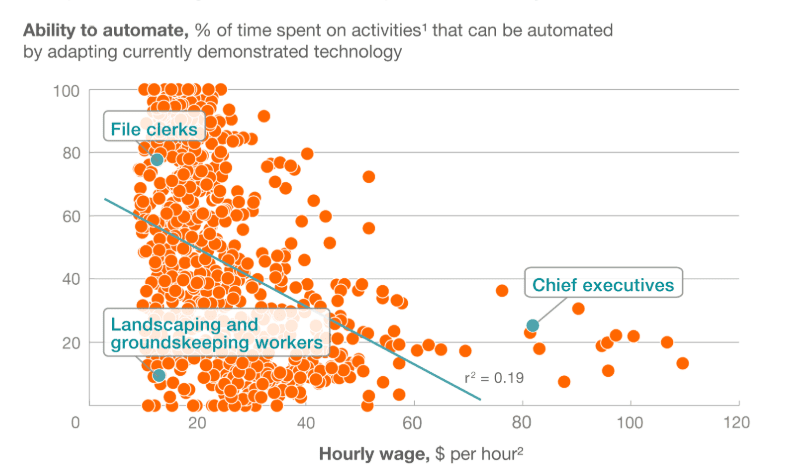
Source: McKinsey & Company, Four Fundamentals of Workplace Automation. - A McKinsey report, Four Fundamentals of Workplace Automation, shows that 60% of jobs can automate at least 30% of their tasks. That’s not about job loss—it’s about time gain.
- Cal Newport’s Deep Work emphasizes that the ability to focus without distraction is a rare and valuable skill. AI helps create the space for that focus.
- Microsoft’s 2023 Work Trend Index found that employees spend 57% of their time communicating and only 43% creating. That imbalance is exactly where AI can help restore intention and impact.
Resources to Help You Work Smarter
If you’re still trying to “do it all,” I highly recommend:
- HBR’s Make Time for the Work That Matters – Read here
- Cal Newport’s Deep Work – A powerful guide to reclaiming focus and producing meaningful work in a world full of distractions.
- Microsoft Work Trend Index 2023 – View report
- McKinsey: Automation & the Future of Work – Read article
- Atomic Habits by James Clear – A must-read on behavior change and energy management
- Attend the Microsoft 365 Copilot Training Class – Invest 1-day to upskill your workday with AI

What I Know Now
We don’t need to earn our rest. We don’t have to prove our worth by how exhausted we are. The most valuable professionals today aren’t the busiest—they’re the most intentional.
And tools like Microsoft 365 Copilot are making that kind of intentionality easier and more accessible than ever.
Ready to start working smarter not harder?
At SAVAGE AI, we empower professionals and enterprises to work with AI, not fear it. Our instructor-led trainings help you and your team reclaim time and scale impact without burning out.
👉 Learn more at www.savageai.com
-
✴︎
How to Calculate ROI on Microsoft 365 Copilot

Wondering how to calculate ROI (return on investment) for implementing Microsoft 365 Copilot? You’re not alone—it’s a challenging task for many organizations. But don’t worry, we’re here to make it easier for you!
Table of Contents
What’s the ROI of Copilot for Microsoft 365?
That’s a great question, one that many organizations like yours are looking at seriously. The benefits of adding an AI assistant to your existing Microsoft tools (you know, Word, Excel, Outlook, Teams, etc.) that your employees use every single day seems like a no-brainer. Yet, most experienced decisions makers understand that IT projects have not always produce their promised payback.
Additionally, some still wonder if AI is just another fad. But you’re likely here because you see it as another game-changing technology, just like the emergence of PCs and the internet in the workplace were at the turn of the last century. And while I’ve covered that topic in detail in other blog posts, this article assumes you are convinced that it is, and want to start reaping the benefits before your organization is left behind trying to catch up.
So in this blog post, we will explore why calculating the return on investment (ROI) for implementing Microsoft 365 Copilot can be a challenging task for organizations, but also how they can do so successfully.
The Potential of Microsoft 365 Copilot
The potential of Microsoft 365 Copilot is substantial, as highlighted in the Forrester Consulting study commissioned by Microsoft. According to the New Technology: Projected Total Economic Impact Of Microsoft 365 Copilot for SMB report, businesses can experience a return on investment (ROI) ranging from 132% to 353% over a three-year period.
This impressive ROI is attributed to several key benefits, including faster time to market, increased productivity, and improved employee satisfaction. The study found that 24% of businesses experienced a 16% to 20% reduction in time to market for new products, and 27% saw improvements ranging from 11% to 15%
Moreover, the report emphasizes that investing in Copilot is not just about enhancing productivity but also about making a strategic investment for long-term growth. The study highlights a 6% increase in net revenue, a 20% reduction in operating costs, and a 25% acceleration in new-hire onboarding.
These transformative results demonstrate that Copilot can help businesses not only streamline their operations but also open doors to additional business opportunities and enhance their competitiveness in the market.
“Upskilling on AI now is absolutely critical to being prepared for its capabilities in a few years. In five years, running a business without Copilot would be like trying to run a company today using typewriters instead of computers.” – Forrester Study: Head Vice President of Technology Services, IT Services and Business Consulting
The Challenge of Calculating ROI
The complexity of calculating a good return on investment arises from three main factors: (1) the difficulty in calculating time saved, (2) understanding all the implementation costs, and (3) how you ensure adoption and use of the tool. In this blog post, we will explore these challenges and provide a framework for calculating ROI, along with two scenarios to illustrate the positive impact of employee training on the ROI. Each of these elements contributes to the overall investment required for a successful implementation.
I will use data derived from inputting multiple scenarios into our Microsoft 365 Copilot ROI Calculator to aid our discussion. You can then use our ROI Calculator yourself to see if the additional $30/user/month license cost is a smart investment for your organization.
The Difficulty In Calculating Time Saved
Calculating time saved can be challenging because it involves estimating the amount of time employees will save by using Microsoft 365 Copilot. In the article “What Can Copilot’s Earliest Users Teach Us About AI at Work?“, it was reported that 67% of users said Copilot saved them time so they could focus on more important work. On average, users reported daily time savings of 14 minutes, or 1.2 hours a week. Additionally, 22% of people said they save more than 30 minutes a day. While these surveys suggest significant time savings, we recommend using a conservative initial estimate of 14 minutes per day to ensure a realistic ROI calculation.
This cautious approach ensures a more realistic ROI calculation. To get a more accurate estimate, organizations can conduct their own surveys, asking employees to estimate how much time they spend in Excel, Word, PowerPoint, Outlook, and Teams each week. This baseline can be followed up post-implementation to calculate the actual time savings.
Organizations can input whatever number they want into our ROI calculator, but it’s important to emphasize that caution is warranted for a good ROI. By using the conservative estimate, we show that you can still obtain a great ROI, leaving it open for a post-implementation review to show an even greater ROI than anticipated.
Understanding All the Implementation Costs
As of the publishing of this article, I could not find many ROI tools for Microsoft 365 Copilot. Of the ones I did, they focused almost entirely on pitting the $30/user/month against estimated time savings.
There are, however, many other costs that need to be included to understand the first year’s investment (assuming that it is implemented in 1 year). Some of these include costs that I have seen firsthand, including IT costs in implementing the software.
While it is true that you simply need to purchase a number of Copilot licenses and apply them to Microsoft 365 accounts, that does not happen automatically. Nor does it ensure that all users are running the most recent version of Microsoft 365 on their PCs, including what is called “New Outlook”. In addition, IT costs vary from organization to organization. As such, our calculator allows you to input your IT costs, whether outsourced or a burdened labor rate and provides an estimate of how much time it takes per user to implement.
If you include employee training in the ROI calculation, it’s important to account for not only the training costs but also the time your employees spend attending the training sessions. Without accurately capturing all these costs, the ROI can be misleading and unrealistic, as it may not reflect the true investment required or the potential risks involved.
The Impact of the Adoption Curve
The adoption curve plays a significant role in determining the ROI of Microsoft 365 Copilot. Organizations that achieve higher adoption rates are more likely to realize the full benefits of the tool. However, achieving high adoption rates often requires a well-thought-out training plan. Without proper training, employees may not fully utilize the capabilities of Copilot, leading to lower productivity gains and a less favorable ROI.

In our previous blog post, The AI Adoption Curve: How to 3-5X Your ROI with Strategic AI Implementation, we discussed the Technology Adoption Curve introduced by Everett Rogers, which segments users into five distinct categories: Innovators, Early Adopters, Early Majority, Late Majority, and Laggards. The first two groups—Innovators and Early Adopters—make up only 16% of your workforce. If you rely solely on them to lead AI adoption, you risk leaving behind the other 84%, resulting in underutilized tools, wasted investment, and slower digital transformation. However, with structured training, you can increase the adoption rate to 84%, ensuring that the majority of your workforce is effectively utilizing the tool and contributing to a positive ROI.
I frequently engage with various organizations and employees. Among those who have implemented Microsoft 365 Copilot, many have not invested in upskilling their workforce. Consequently, as Everett Rogers predicted in 1962, the majority of these employees report either never using the tool or trying it but not achieving the desired results, both of which can be attributed to a lack of proper training.
Including Training in the Plan
Incorporating employee training into the implementation plan is crucial for maximizing the ROI of Microsoft 365 Copilot. Training helps employees understand how to use the tool effectively, leading to higher adoption rates and greater productivity gains. In short, don’t forget your humans. Your employees are still your most valuable resource. Despite the media hype, AI rarely replaces employees. This is because AI can not replace natural talent, years of experience, and complex discernment that only comes from a combination of both. In addition, they are often need to do final reviews of AI generated content. It does however work great as an assistant (or Copilot) saving knowledge workers substantial time each day, with the potential savings increasing as the technology improves.
AI can not replace natural talent, years of experience, and complex discernment that only comes from a combination of both.
While employee training comes at an additional cost, the long-term benefits often outweigh the initial investment. Once training is introduced, a higher adoption rate becomes assured. Even with conservative estimates of time saved per employee, the ROI that includes training costs is compelling enough to encourage organizations to implement Microsoft 365 Copilot sooner rather than later.
Forward-thinking organizations recognize that their employees are eager to use AI and can envision the significant contributions their experienced talent will make in advancing new initiatives and projects when supported by tools like Copilot. To illustrate the impact of employee training on your ROI, let’s consider some scenarios:
Scenarios 1: Rolling out Microsoft 365 Copilot to 100 employees without training
In this scenario, we used the default parameters, as explained in the calculator and mentioned above. Here are the results for 100 users without training:
Number Of Copilot Licenses 100 Total Investment $37,250 Hours Saved / Week / Employee 1.2 Total Cost Savings $23,003 Return on Investment (ROI) -$14,247 ROI Rate -38% Are you surprised that implementing Copilot without training results are a negative ROI? Most are, as they understand that Microsoft 365 Copilot is the future of Office productivity, and can see the potential benefits so clearly. Yet as we’ve discussed, a good ROI does not hide costs, and mitigates all risks.
The risk considered in this scenario is the technology adoption curve. First described in 1962 by Everett Rogers in his book ‘Diffusion of Innovations,’ it shows that without specific intervention, only 16% of employees will adopt new technologies and methods. This means that simply licensing Microsoft 365 Copilot and distributing training materials is unlikely to result in adoption rates above 16%. So you can only take the savings in hours per week against that percentage of your licensed workforce that actually start using the tools. It’s simple, most employees do not do this on their own.
Does training really have that much impact on adoption?
Scenarios 2: Rolling out Microsoft 365 Copilot to 100 employees with training
In this scenario, we again used the default parameters, as explained in the calculator and mentioned above. However, notice the difference in the results for 100 users with training:
Number Of Copilot Licenses 100 Total Investment $105,182 Hours Saved / Week / Employee 1.2 Total Cost Savings $120,766 Return on Investment (ROI) $15,584 ROI Rate 15% Notice that even with a significant increase in cost due to the inclusion of employee training costs, the overall ROI is now positive! By choosing to provide comprehensive training, you’ve effectively increased the adoption rate of Microsoft 365 Copilot to 84%, as opposed to the mere 16% adoption rate without such intervention. This higher adoption rate translates directly to greater efficiency, productivity, and ultimately, cost savings for your business.
Scenarios 3: Rolling out Microsoft 365 Copilot to 100 employees with training and increase savings per day
Yet as discussed above, your total cost savings are potentially double the 14 minutes per day we are estimating. According to many studies, users are reporting closer to 30 minutes per day in savings by using Copilot. How does that impact our ROI calculations?
Number Of Copilot Licenses 100 Total Investment $105,182 Hours Saved / Week / Employee 2.5 Total Cost Savings $251,597 Return on Investment (ROI) $146,415 ROI Rate 139% For 100 employees, that’s 13,000 hours saved annually. Assuming an employee provides 2,000 hours per year, you’ll have freed up the equivalent of 6.5 employees per year. And this not just avoiding the cost of adding 6 new hires to accomplish your company initiatives. Think of what your experienced employees could accomplish, and how appreciated they will feel, having their talents fully realized as they contribute further to your company’s growth.
Scenarios 4: Rolling out Microsoft 365 Copilot to 100 employees with discounted group training
Another opportunity is group pricing on Copilot training for your employees. All training providers provide such discounts, and SAVAGE AI is no exception. So while we took a conservative approach thus far to the training costs by including the class at the retail price, your ROI will increase significantly with a group discount. Why not schedule a discovery call with us to discuss your needs and find out how much you can save on training.
Number Of Copilot Licenses 100 Total Investment $95,282 Hours Saved / Week / Employee 2.5 Total Cost Savings $251,597 Return on Investment (ROI) $156,315 ROI Rate 164% Conclusion
When calculating ROI, it’s crucial to consider risk factors and how to mitigate them. Without proper employee training, you risk low adoption rates, which can dilute your ROI. Our free ROI Calculator tool allows you to use your own estimates and costs to get a realistic picture. And SAVAGE AI is ready to help your organization succeed in your adoption of Microsoft 365 Copilot by offering group pricing.
By understanding the challenges of measuring ROI, the impact of the adoption curve, and the importance of employee training, organizations can make informed decisions and maximize the value of their investment in Microsoft 365 Copilot. Investing in training ensures a smooth implementation process and demonstrates the value of a well-planned adoption strategy. Keep leveraging the full potential of Microsoft 365 Copilot to drive your business forward!


See more articles…
Or browse by category…
- Free Articles (15)
- News (11)